Google warns “noindex” may still result in rendering JS pages, but block the script from running


In December 2025, Google updated its JavaScript SEO guidelines, clarifying how Googlebot handles pages with a noindex directive.
SpaceLama’s team dug in to explore what Google actually meant when talking about noindex on JavaScript pages, why it’s important for technical SEO, and how to manage indexing in today’s web projects. Here’s what we found.
What Google said about noindex
The discussion arose from updates in Google Search Central about JavaScript SEO and indexing behavior. Google made it clear that if a noindex directive is in the initial HTML, Googlebot might not render the page at all. This means the JavaScript intended to change or remove the noindex directive may not run.
A key point from Google’s documentation states:
“If a page has a noindex rule in the initial HTML, Google may skip rendering the page, which includes executing JavaScript.”
Google emphasizes that this behavior is expected and makes sense from a technical standpoint. So, developers and SEO specialists can’t count on JavaScript running before Google decides whether to index the page.
Further clarification has come from comments by Google Search team members. John Mueller has repeatedly pointed out that noindex is an indexing signal, not a promise of a specific processing order:
“Googlebot doesn’t need to fully render a page to see a noindex directive, and if it sees it early, it might decide there’s no reason to keep processing.” –
Indexing, rendering, and JavaScript execution
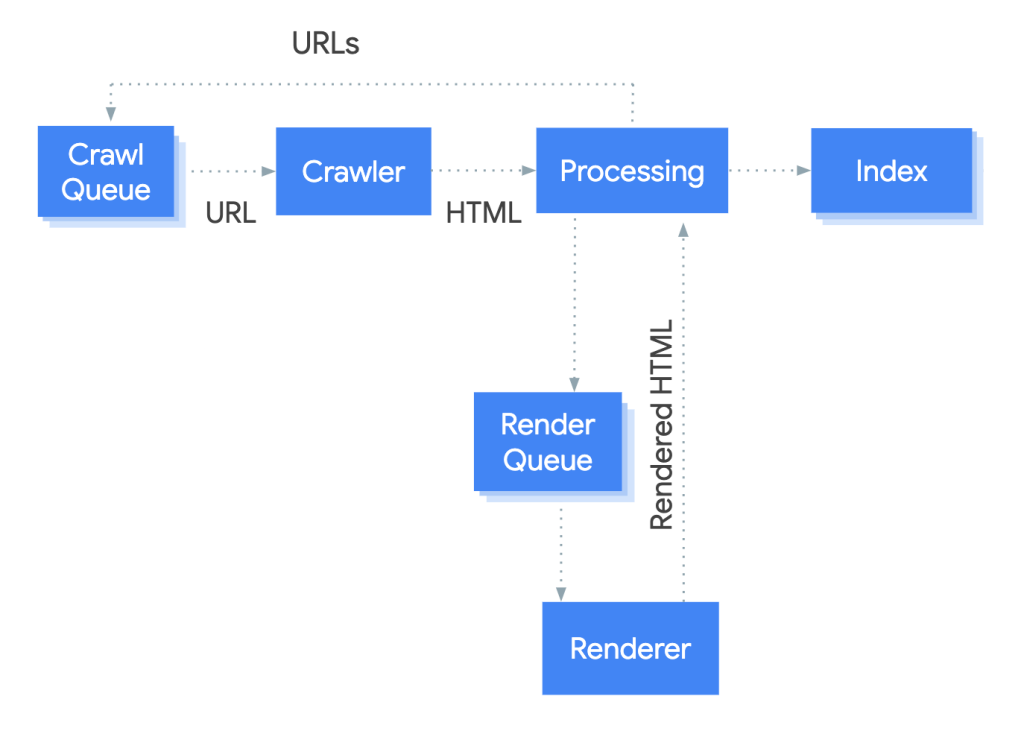
One major source of confusion around noindex is the unclear distinction between Googlebot’s page processing steps. Google often highlights that crawling, rendering, JavaScript execution, and indexing are different processes that don’t always happen fully or in a set order.
Crawling
Crawling happens first. Googlebot downloads the HTML document from the URL and, at this stage, can detect meta tags such as noindex or nofollow. It also retrieves HTTP headers and makes an initial decision on whether more processing is needed. At this stage, Google does not render the page or run JavaScript.
Rendering
If Google determines that further processing is warranted, the HTML is passed to the Web Rendering Service (WRS). During the rendering stage, the DOM is built, resources are loaded, and JavaScript may be executed. The key point is that rendering is optional: it takes resources, so Google specifically mentions it doesn’t render every page.
JavaScript execution
JavaScript execution is only possible as part of the rendering process. JavaScript only runs during the rendering process. If Google opts not to render a page, no scripts will execute, no matter what they’re supposed to do.
Indexing (happens last)
Only after this does the indexing stage occur. At this point, Google decides whether the page should be added to the index and which content or signals should be considered. The noindex directive is applied specifically at this stage (indexing). It influences the indexing decision, but it does not control earlier steps such as crawling or rendering.
Google explicitly notes that the presence of a noindex directive in the initial HTML can make rendering unnecessary. This leads to a key takeaway: if noindex is visible to Googlebot before rendering, it might decide that running JavaScript isn’t worth the effort.
Why does Google still render pages with noindex?
At first, it seems obvious: if a page is marked as noindex, why would Google bother processing it? However, indexing is just one part of a bigger workflow for search engines.
Google says that while noindex does stop a page from being added to the index, it doesn’t stop the page from being downloaded, analyzed, or processed. This distinction is fundamental and often overlooked.
In other words, noindex:
- does not prevent Googlebot from accessing the page;
- is not a “do not visit” directive;
- does not guarantee that the page will not be analyzed by Google.
This naturally raises the question: why does Google continue to process such pages?
Why does Google continue to process such pages?
One reason is site structure and internal link analysis. Even if a page itself is not indexed, links on that page can still influence crawl budget allocation, help Google understand the site’s architecture, and clarify relationships between different sections. This is especially relevant for JavaScript-based sites, where some links are only visible after rendering. Google has confirmed that rendering can be useful for this type of analysis.
Another reason is understanding patterns and repeated content. Service, filter, or test pages often rely on the same templates and components as indexable pages. Analyzing these URLs helps Google better understand the site as a whole, particularly in the case of SPAs or projects built on a single shared codebase.
A third reason relates to technical diagnostics and security. Google may analyze pages for malicious scripts, hidden redirects, or security policy violations. The presence of a noindex directive does not exempt a site from such checks.
Ultimately, Google decides how deeply to process a page based on signals in the HTML, the URL’s importance, and past experiences. Thinking of noindex as a universal “off switch” is a mistake, particularly with modern JavaScript projects.

Where does this create real problems in practice?
The issue with noindex and JavaScript becomes evident when a site relies on JavaScript for both content and core logic. Googlebot’s behavior can impact SEO outcomes and technical stability.
For example, in a single-page application built with React, Vue, or Angular, the server often returns minimal HTML. If a noindex directive is in the initial HTML, Googlebot may never reach the JavaScript execution stage, leading to missed dynamic content and critical SEO logic.
Another scenario includes utility and test sections. Staging pages, filters, and temporary interfaces often get marked as noindex but aren’t blocked for crawling. Googlebot accesses these URLs, potentially creating unnecessary load and cluttering server logs.
A separate issue arises when private logic is in JavaScript. Access checks and business logic may rely entirely on client-side execution. It’s vital to note that noindex isn’t a security measure. Google explicitly states it shouldn’t be used to protect private content. If a page is accessible without authentication, Googlebot can analyze its code, regardless of the noindex.
These problems are often discovered accidentally. The index looks clean, Search Console shows no errors, but unexpected Googlebot requests appear in logs, leading to inconsistencies during debugging.
Why noindex is a poor tool for “hiding” pages
One common mistake is treating noindex as a universal way to make a page invisible to Google. In reality, noindex does one thing. It prevents a URL from being added to the search index. Everything else is a side effect, not guaranteed by Google.
This leads to several important conclusions related to different outcomes a webmaster may want to achieve by slapping a noindex tag on all of their webpages.
Access
noindex doesn’t stop Googlebot from accessing a page. If a URL is public, not blocked by robots.txt, and doesn’t return a 4xx or 5xx code, Googlebot may visit it.
JavaScript Processing
noindex doesn’t ensure JavaScript won’t load or run. Google might stop at the raw HTML stage or render the page partially or fully. This decision is made by Google, not the developer.
Data Protection
noindex doesn’t protect any of your data or business secrets. Any client-accessible code might (and will probably) be analyzed by that pesky Googlebot. Google states that private data should be secured with server-side access controls, not SEO directives.

What to do instead of noindex
If the goal is to manage Googlebot’s behavior, use tools that work at the right level: crawling, access control, rendering, and server-side logic. noindex solves one specific problem and isn’t suitable for all the other issues that you may have.
Here’s what to do instead of using noindex mindlessly.
- For pages that shouldn’t be crawled, use robots.txt. Google recommends this for blocking crawling. Google clearly distinguishes between these scenarios and recommends using robots.txt specifically to block crawling rather than relying on noindex.
- For private or test pages, server-side authorization is the only effective method. This way, Googlebot can’t access the HTML, JavaScript is not loaded, and neither code nor data is analyzed. Critical SEO logic should also be implemented on the server. If decisions about indexing, canonicalization, redirects, or access depend on JavaScript, their execution cannot be guaranteed.
Overall, this comes down to your architecture. Public pages should be fully ready at the HTML level, service pages should be inaccessible to crawlers, and SEO signals should stay stable.
noindex controls indexing and nothing more. It does not prevent Googlebot from accessing a page, does not guarantee rendering or non-rendering, does not ensure JavaScript execution, and does not protect code, data, or business secrets.
So, the core mistake is treating noindex as a universal control mechanism. In modern JavaScript-heavy projects, this is especially risky. Client-side rendering, dynamic meta tags, and conditional logic cannot be reliably processed by search engines.
The practical takeaway is straightforward:
- If a page shouldn’t be indexed, use noindex.
- If it shouldn’t be crawled, use robots.txt.
- If the page shouldn’t be accessible, use server-side authorization.
- If SEO logic is critical to you, handle it on the server side and not in JavaScript.
And if you’re looking for a fantastic SEO-optimized hosting that prioritizes speed, security, and convenience, you can’t go wrong with SpaceLama – a phenomenal hosting service.