What is email routing? Everything you need to know


Email remains one of the most resilient and widely used technologies on the internet. According to Statista, there are over 4.3 billion email users worldwide, with more than 340 billion emails sent each day.
Registration confirmations, payment notifications, contracts, support tickets, invoices, and internal communications all rely on email. If this system fails, it can directly impact revenue, customer experience, and brand reputation.
Understanding how email routing works is key to maintaining reliability and control over these communications.
What is email routing?
Email routing refers to the process that determines the path an email message takes from sender to recipient. Essentially, it’s a set of rules and technical mechanisms that define which servers the message passes through, where it’s ultimately delivered, and what checks are applied along the way.
When a user clicks “Send,” the email client sends the message to the sender’s SMTP server. This server then queries the DNS records of the recipient’s domain to retrieve the corresponding MX records, which specify the mail server responsible for receiving messages for that domain.
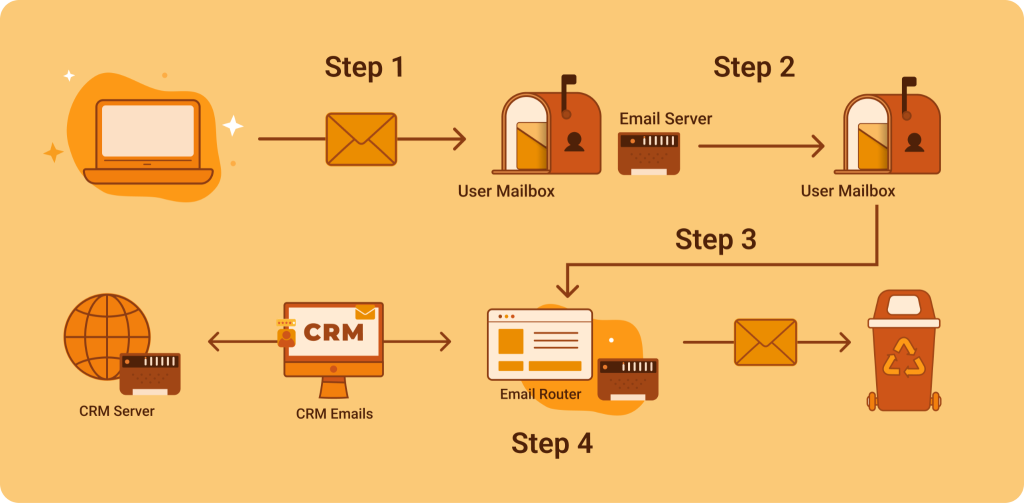
The message is transferred between mail servers, often through multiple relays. Throughout this process, it undergoes authentication checks like SPF, DKIM, and DMARC validation, along with spam filtering and antivirus scanning. Only after these checks are completed is the message delivered to the recipient’s mailbox or an integrated processing system (such as a CRM or helpdesk platform – see the image below).
Types of email routing
- Basic routing (MX-based) is the simplest configuration. It relies solely on a domain’s MX records. The DNS tells the sending server which mail server receives messages for that domain, with no extra rules involved. If there are multiple MX records, they are prioritized, typically starting with a primary server and followed by a backup server.
Suitable for small companies or projects without a complex internal infrastructure.
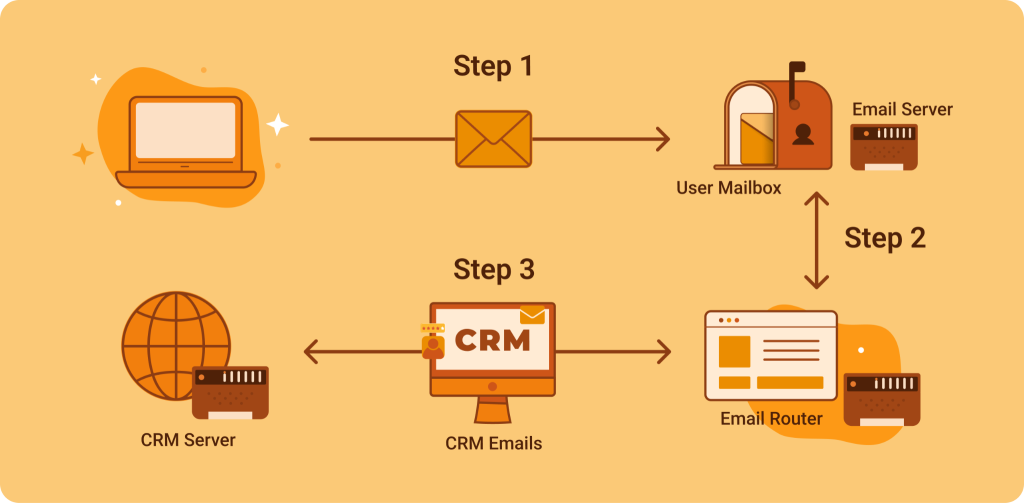
- Rule-based routing represents a more sophisticated approach. Here, emails are sorted based on specific rules like recipient address, subject line, message content, or sender. For instance, emails sent to sales@ may route to a CRM system, while those to support@ are directed to a ticketing platform.
Suitable for modern helpdesk and corporate email environments.
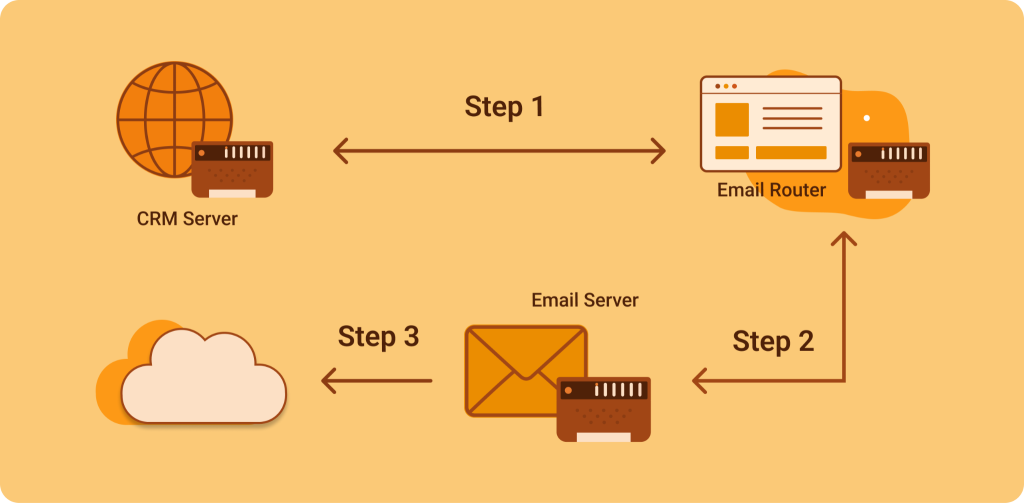
- Load-balanced routing is used by organizations handling lots of emails. It spreads messages across several servers to avoid overload. If one server gets too busy, the system automatically redirects traffic.This reduces delivery delays and improves infrastructure resilience. Which is a fancy way of saying “make the whole system more reliable”.
Suitable for e-commerce platforms and fintech companies.
- Conditional routing is more flexible. The delivery path can change based on additional factors, like the sender’s domain, keywords in the subject line (like “Complaint,” “Invoice,” or “Urgent”), geographic area, or attachment type. In global companies, emails can be sent to different offices—like inquiries from Europe going to a European support center while messages from Asia go to an Asian support center.
Suitable for companies operating across multiple regions.
- Cloud-based routing is common in modern setups that use cloud services. Here, routing is managed through the cloud provider’s control panel or APIs, mixing both internal and external mail servers. Companies can use a hybrid model, processing some of their email traffic locally and the rest through the cloud platform.
Suitable for fast-growing companies and SaaS projects.
Email routing vs Email forwarding
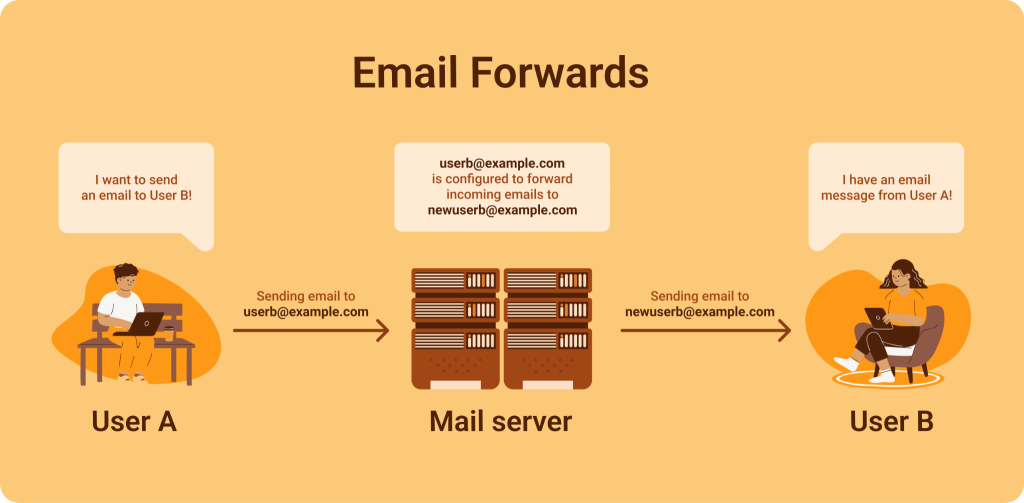
The main difference between email routing and email forwarding is when the redirection occurs.
Email routing happens before a message is delivered to a specific mailbox. The system decides the delivery path and processing rules ahead of time.
On the other hand, forwarding is usually for simple, user-level tasks. For example, a company might have an [email protected] address that the director monitors. An employee going on vacation may set up automatic forwarding to send emails to a colleague.
Because of that, email routing becomes essential when you need structured processing and scalability. It’s used for automatically distributing emails across departments, integrating messages into a CRM or helpdesk system, or filtering based on priority, region, or other criteria.
In enterprise environments, forwarding often falls short. It doesn’t scale well, can create forwarding loops, and may conflict with security or authentication policies.
Why use email routing?
Support automation
When incoming requests are automatically distributed across departments or team members, response times improve, and workloads decrease. For example, emails with the subject line “Refund” can be sent directly to the finance department, technical inquiries to IT support, and complaints to a dedicated high-priority queue. This approach goes beyond convenience. It reduces human error and ensures more consistent and predictable handling of requests.
Load balancing
E-commerce, fintech, and SaaS platforms may handle thousands, even tens of thousands, of emails daily. Without proper routing, servers can become overloaded, leading to delays and potential message delivery failures. Routing allows traffic to be spread across multiple servers or data centers, ensuring fault tolerance and stable performance, even during peak times.
Deliverability
Deliverability is the ability of an email to reach its intended recipient successfully. Incorrect routing can result in messages being flagged as suspicious, marked as spam, or rejected due to authentication failures. Properly configured routing considers SPF, DKIM, and DMARC policies. It minimizes unnecessary relays and prevents loops that could harm domain reputation.
Processing speed
Customers expect responses within hours (if not minutes), so any technical delay can affect satisfaction. Automated routing not only ensures faster delivery but also integrates emails directly into operational workflows by creating tickets, assigning ownership, and setting priorities.
Security
Routing can be part of a multi-layered security strategy. It includes filtering suspicious messages and isolating potentially harmful attachments. It also can be used for separating traffic for internal and external senders. In hybrid or distributed environments, routing helps manage which emails are processed through on-premises servers versus those that pass through cloud-based gateways.
How to use email routing
Customer support automation
This is one of the most common use cases. When a customer sends an email to [email protected], the system doesn’t just deliver it to a shared inbox. Instead, it automatically creates a helpdesk ticket, identifies the request category, assigns a priority level, and routes it to the appropriate specialists. For example, emails with attachments may go to a technical queue, while messages containing the keyword “refund” are directed to the finance queue. This process reduces response times and minimizes manual sorting.
Interdepartmental routing
In companies with many departments, routing ensures that emails reach the right team without human intervention. Messages sent to hr@ are automatically forwarded to recruiting, inquiries sent to partnership@ go to the business development team, and supplier invoices are directed to accounting.
Global companies and regional routing
International companies often route emails based on region. Emails from Europe can go directly to a European support center, while messages from Asia are sent to an Asian support center. Routing can depend on the sender’s domain, the message language, or the sender’s IP address.
Spam filtering and security layers
Routing is often linked with filtering and security systems. Suspicious emails may first go through a security gateway for checking before being quarantined or scanned further. Internal and external emails can take different paths to lower the risk of phishing attacks and harmful attachments.
Disaster recovery and fault tolerance
If the main mail server goes down, good routing can automatically send emails to a backup server or a cloud service. This is very important for financial, legal, and e-commerce companies, where even a few hours without email can cause serious financial losses. Backup routes and MX records with proper priorities help keep the system running smoothly.
Email routing and security
Authentication mechanisms like SPF, DKIM, and DMARC are key to email security. SPF (Sender Policy Framework) checks that the sending server is allowed to send emails for a specific domain.
DKIM (DomainKeys Identified Mail) adds a digital signature that confirms the message’s integrity. DMARC builds on these checks and sets rules for handling unauthenticated messages: it can accept, quarantine, or reject them. If routing is set up incorrectly—like adding unnecessary relays or changing message headers—authentication can fail, which hurts deliverability.
Filtering rules are also super-duper important. Routing decides which emails get extra checks, which ones are quarantined, and which are safe. For example, emails with certain types of attachments may be sent to a separate area for analysis, while messages from unknown domains go to a review queue.
Many companies use layered anti-spam systems. These check the sender’s reputation, look at the message content, and use machine learning to spot phishing attempts. In large organizations, emails often pass through an external security gateway, then internal filters, before reaching their destination. Here, routing controls the order of these checks.
Regulatory compliance is another key aspect. Different areas have rules for how data should be stored and handled, like GDPR in the EU. Routing helps manage email flows, ensuring emails from European clients are processed on EU servers, while internal messages stay on local servers. This approach reduces compliance risks and makes auditing easier.
Email routing is an infrastructure layer that is rarely discussed until a major failure occurs. For small projects, a basic MX configuration and a limited set of rules may be sufficient. However, as a business grows, email becomes deeply embedded in operational workflows and mission-critical processes.
Routing errors can result in lost requests, transaction delays, reduced deliverability, and even security vulnerabilities. A properly designed routing architecture, by contrast, ensures fault tolerance, operational transparency, and regulatory compliance.
In a world where digital communication is essential for interactions with customers and partners, email routing is a key part of business resilience. The sooner you treat it as an important infrastructure element, the lower your operational risks and the higher your long-term efficiency.
But hey! If you’re looking for top-notch email routing, SpaceLama is the perfect choice. Our hosting services and domain offerings are reliable and user-friendly, making it easy to manage our email needs seamlessly. With SpaceLama, we get exceptional value that stands out in the market, providing everything needed for effective email communication without breaking the bank.
What truly sets SpaceLama apart is our outstanding customer support, available 24/7. Whether we have a question about email routing setup or need assistance with our hosting, our dedicated team is always ready to help. With SpaceLama, you can trust that your email systems will run smoothly, giving you peace of mind to focus on what matters most: running your business.